There are countless unit conversion apps on the Google Play Store. However, most of them have poor and complicated user interfaces. Over the past 15 years, I’ve been refining my unit conversion app to make it intuitive and easy to use.
This app cannot include every unit in the world. It displays only common units selected based on user feedback. The list of units displayed varies depending on your country and system language.
※ Introduction video
※ List of units
※ How to use
※ Menu & Settings
※ Custom list of currencies
※ Data storage / flow ?
※ Some units were not found while traveling abroad.
※ What is the Ad-free menu ?
※ FAQ
※ Pro version additional features
※ What's new
※ Introduction video
※ List of units
① Basic : length (distance), area, weight (mass), volume (capacity)
② Living : exchange rates, temperature, time, speed, shoes, clothing, hat, ring
③ Science : pressure, force, work (energy), power, torque, flow, current, voltage, density, viscosity, concentration, magnetic flux density, astronomy
④ Misc. : cooking, data, fuel efficiency, angle, illuminance, radiation, prefixes, binary (ASCII), time zones, blood sugar, AWG, hardness, numbers
※ How to use
1) Select a category (Basic / Living / Science / Misc.)
2) Select one of the 4 tabs
3) Select a unit by LONG-CLICK on the list or click the selector
4) Tap the number input field, then use the keypad to enter a number.

※ Favorites.
You can select up to 4 favorites from the Living, Science and Misc. categories.

※ How to add [Torque] units.
① go to the Science category
② click the favorites icon on the app bar
③ uncheck one of your current 4 favorites

④ check [Torque] as your favorite
⑤ return to the home screen
⑥ tap the [Torque] tab

※ Menu & Settings
 ① Country selection
② Language selection
③ Sound effect on/off
② click the favorites icon on the app bar
③ uncheck one of your current 4 favorites

⑤ return to the home screen
⑥ tap the [Torque] tab

※ Currency (exchange rates).
- 120+ currencies, Bitcoin, XAU
- Click the refresh icon to receive the latest exchange rates from the servers.
- Exchange rates are based on Bank of canada, Fx-exchange, FxexchangeRate, etc.
- There may be a delay of 1 to 12 hours. Exchange rates are provided for reference only.

- 120+ currencies, Bitcoin, XAU
- [My currency] is automatically set based on your mobile carrier and system language.
- You can select a region from the list in the app bar: All / Majors / Europe / ...- Click the refresh icon to receive the latest exchange rates from the servers.
- Exchange rates are based on Bank of canada, Fx-exchange, FxexchangeRate, etc.
- There may be a delay of 1 to 12 hours. Exchange rates are provided for reference only.

※ Menu & Settings

② Language selection
③ Sound effect on/off
④ My Currency
⑤ Region : Majors, All, Custom, Europe, America, Asia, ...
⑤ Region : Majors, All, Custom, Europe, America, Asia, ...
⑥ Decimal format
⑦ Keypad layout
⑧ Vibration : turn keypad vibration on/off
⑧ Vibration : turn keypad vibration on/off
⑨ Sleep : screen auto-off


※ How to enter fractions.
When entering length and weight, there is a [. /] button on the keypad. You can use it to enter fractions.
ex1) 5 1/4 => [5] + [./] + [1] + [./] + [4]
ex2) 3/8 = 0 3/8 => [./] + [3] + [./] + [8] (Look out!! 3/8 is less than 1.)
or [3] + [./] [./] + [8]
ex1) 1˚ 23' 45.67" => [1] + [.˚'] + [2][3] + [.˚'] + [4][5] + [.˚'] + [6][7]
ex2) 0˚ 1' 2" => [.˚'] + [1] + [.˚'] + [2]
※ Data storage / flow ?
b : bit
B : byte
k : kilo (1000)
Ki : kibi (1024)
M : mega (1000 x 1000)
Mi : mebi (1024 x 1024)
kbps : kilo bit per second
※ Some units were not found while traveling abroad.
※ What is the Ad-free menu ?
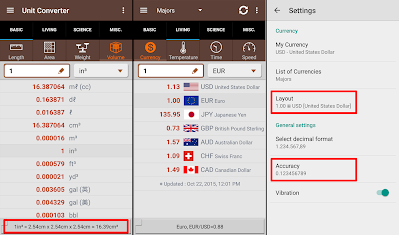
Watch a 30-second reward video to remove all ads for 9 hours. In other words, you’ll get the same experience as the paid version.

1) No ads
2) The bottom box for useful information (unit names, formulas, ...)
3) More options at the settings (accuracy, layout, decimal places)

※ Update pending
- more style with various colors (Done !)
※ Custom list of currencies
① Select "Custom" from the list at the top,
② Click the (+) button in the bottom right corner.
③ Check the currencies in the order you want.
① Select "Custom" from the list at the top,
② Click the (+) button in the bottom right corner.
③ Check the currencies in the order you want.

- You can select up to 10 currencies.
- If nothing is selected, only your currency will be displayed.
※ How to move units.
- You can move units in the "Basic" category.
- Click the [More (3 dots)] and [Edit] menu to display the move icons for each row.
- Select a unit that you want to move, and LONG-CLICK its move icon.
- You can move units in the "Basic" category.
- Click the [More (3 dots)] and [Edit] menu to display the move icons for each row.
- Select a unit that you want to move, and LONG-CLICK its move icon.
- Drag the floating unit to the desired position and drop it.

- To finish, click the [Back] key or re-select [Edit] menu.
- Changing the country selection in Settings will reset the repositioned units.
When entering length and weight, there is a [. /] button on the keypad. You can use it to enter fractions.
ex1) 5 1/4 => [5] + [./] + [1] + [./] + [4]
ex2) 3/8 = 0 3/8 => [./] + [3] + [./] + [8] (Look out!! 3/8 is less than 1.)
or [3] + [./] [./] + [8]
※ How to enter "ft and inch" at the same time
Select the "ft in" unit. You can use fractions when entering various values. The same applies to "lb oz".
ex1) 2' 3.5" => [2] + [ ' "./ ] + [3] + [ ' "./ ] + [5]
ex2) 1' 2 5/8" => [1] + [ ' "./ ] + [2] + [ ' "./ ] + [5] + [ ' "./ ] + [8]
※ How to enter "deg min sec"
Select the "deg min sec" or "deg" unit in Angle tab. You can enter "deg min sec" using the [.˚ '] button on the keypad.
Select the "ft in" unit. You can use fractions when entering various values. The same applies to "lb oz".
ex1) 2' 3.5" => [2] + [ ' "./ ] + [3] + [ ' "./ ] + [5]
ex2) 1' 2 5/8" => [1] + [ ' "./ ] + [2] + [ ' "./ ] + [5] + [ ' "./ ] + [8]
※ How to enter "deg min sec"
Select the "deg min sec" or "deg" unit in Angle tab. You can enter "deg min sec" using the [.˚ '] button on the keypad.
ex1) 1˚ 23' 45.67" => [1] + [.˚'] + [2][3] + [.˚'] + [4][5] + [.˚'] + [6][7]
ex2) 0˚ 1' 2" => [.˚'] + [1] + [.˚'] + [2]
※ How to enter "hh:mm:ss"
Select "hh:mm:ss" or "hour" unit in Time sec. You can enter "hh:mm:ss" with [. :] button on the keypad.
ex1) 1:23:45 => [1] + [. :] + [2][3] + [. :] + [4][5]
ex2) 0:00:02 => [. :] + [. :] + [2]
Select "hh:mm:ss" or "hour" unit in Time sec. You can enter "hh:mm:ss" with [. :] button on the keypad.
ex1) 1:23:45 => [1] + [. :] + [2][3] + [. :] + [4][5]
ex2) 0:00:02 => [. :] + [. :] + [2]
※ Data storage / flow ?
To save a tab, this app displays both "data storage" and "data flow" on the "Data" tab. It is not an error. By the way, do you know the difference between "kb", "kB", "kib", "kiB", "kbps"?
b : bit
B : byte
k : kilo (1000)
Ki : kibi (1024)
M : mega (1000 x 1000)
Mi : mebi (1024 x 1024)
kbps : kilo bit per second
※ Some units were not found while traveling abroad.
This app displays different units depending on the user's country. It can guess the user's country based on the mobile carrier and system language.
When traveling abroad, a different set of units may be displayed due to international roaming. In this case, please select the appropriate country in the [Country selection] option in Settings.
※ What is the Ad-free menu ?
Watch a 30-second reward video to remove all ads for 9 hours. In other words, you’ll get the same experience as the paid version.

※ FAQ.
Q. I need more units such as kHz, MHz, GHz ...
A. Why not try using the "Prefix"?
Q. How do I mute video ads?
A. Turn off [sound effect] option at the settings.
※ Pro version additional features:Q. How do I copy the result to the clipboard?
A. Tap the result twice (Double-tap).
Q. How do I convert grams to liters?
A. "gram" is a weight unit, "liter" is a volume unit. These cannot be converted into each other. 1L of water = 1kg, 1L of gasoline = approx. 0.70kg
Q. Where can I find the "A (amp)" unit?
A. Click the favorites icon in the Science category. Check the [Current] checkbox.
Q. "kg" is a unit of mass, not weight.
A. I know that. weight = mass x gravity. On earth, "mass" and "weight" are the same.
Above all, "weight" is a familiar term, and the public does not fully understand "mass".
A. Tap the result twice (Double-tap).
Q. How do I convert grams to liters?
A. "gram" is a weight unit, "liter" is a volume unit. These cannot be converted into each other. 1L of water = 1kg, 1L of gasoline = approx. 0.70kg
Q. Where can I find the "A (amp)" unit?
A. Click the favorites icon in the Science category. Check the [Current] checkbox.
Q. "kg" is a unit of mass, not weight.
A. I know that. weight = mass x gravity. On earth, "mass" and "weight" are the same.
Above all, "weight" is a familiar term, and the public does not fully understand "mass".
Q. I need more units such as kHz, MHz, GHz ...
A. Why not try using the "Prefix"?
Q. How do I mute video ads?
A. Turn off [sound effect] option at the settings.
1) No ads
2) The bottom box for useful information (unit names, formulas, ...)
3) More options at the settings (accuracy, layout, decimal places)

※ Update pending
- more style with various colors (Done !)
- move units up/down (Done !) and remove
- custom unit adding
※ What's new
- v1.7.10 : Android 16 support
- v1.0 : Released (Nov, 2013)
https://play.google.com/store/apps/details?id=kr.sira.unit
If you have any suggestions for improvements, please feel free to contact us at androidboy1@gmail.com Thank you.
https://play.google.com/store/apps/details?id=kr.sira.unit
If you have any suggestions for improvements, please feel free to contact us at androidboy1@gmail.com Thank you.

.png)
.png)


.jpg)
.jpg)
